
To return to the PO Inquiry article contents page please click here.
Structure Type: Property Only
Navigation: Purchasing > Purchase Order Inquiry > in a drop-down list, click By Product > click Search > select a product > click Details
Use this screen to get the list of purchase orders for the selected product.
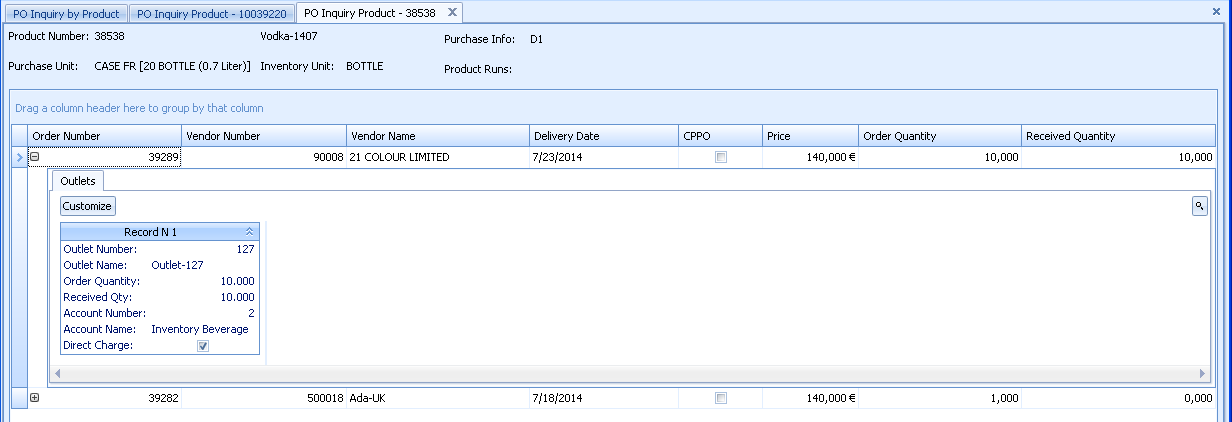
Fig 1 - PO Inquiry by Product — Details
| Field name | Description |
| Product Number | Displays the product number. |
| Purchase Unit | Displays the purchase unit selected for the product on the Product Details screen. |
| Inventory Unit | Displays the inventory unit selected for the product on the Product Details screen. |
| Purchase Info | This column displays the purchase information specified on the Product Details screen. |
| Product Runs | Displays the values assigned to the retail attributes for the corresponding product (if any). |
| Order Number | Displays the numbers of purchase orders where the selected product was received. Click the   button to the left of the order number to see the details. button to the left of the order number to see the details. |
| Vendor Number | The number of a vendor. |
| Vendor Name | The name of a vendor for the corresponding purchase order. |
| Delivery Date | Displays the delivery date, specified on the Purchase Order Details screen when creating a purchase order. |
| CPPO | If the corresponding purchase order was created at a Central Purchasing, this check box will be selected. |
| Price | The price per purchase unit. |
| Order Quantity | The number of purchase units ordered. |
| Received Quantity | The number of purchase units received. |
Comments
Please sign in to leave a comment.