
Overview
This report confirms the details of goods which are ‘written off’ from a location. This can apply to a genuine write off of goods or the consumption of expenses by a department.
The data is pulled from posted Transfers, which can be accessed in Requisition > Transfer Center.
Please note: This is a customer-specific report which is coded to meet those specifications, and may not be applicable to all customers.
Process
To run the Writing Off / Consumption of Goods Report:
-
Go to Report Center > Requisition Reports > Writing Off / Consumption of Goods
-
Select the Write Off / Consumption of Goods Report and Run Report
This will open the ‘Report Criteria’ screen, seen in Fig.1.
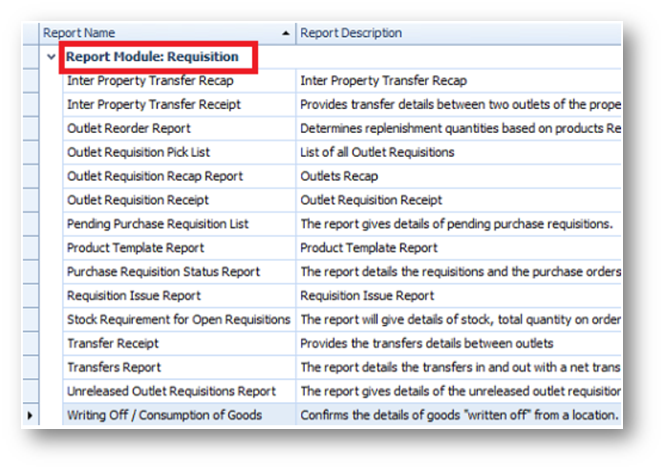
Fig.1 - Running the Writing Off / Consumption of Goods report
Report Criteria:
-
Populate the fields of the Report Criteria, seen in Fig.2 and information in Table 1
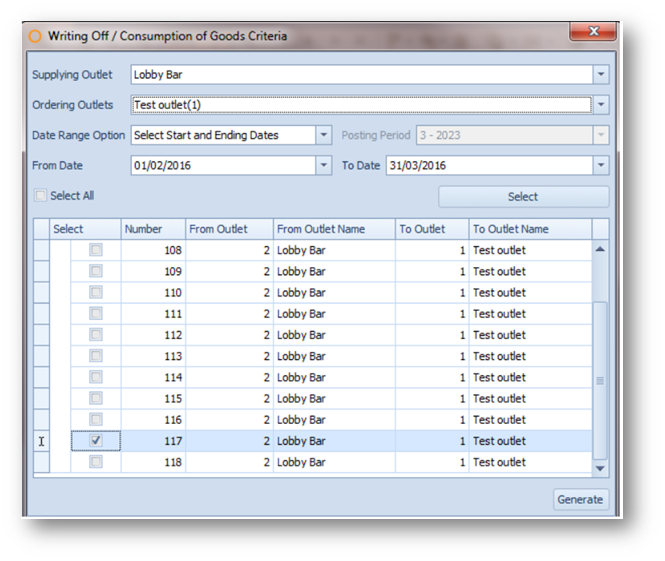
Fig.2 - Report Criteria for the Write Off / Consumption of Goods Report
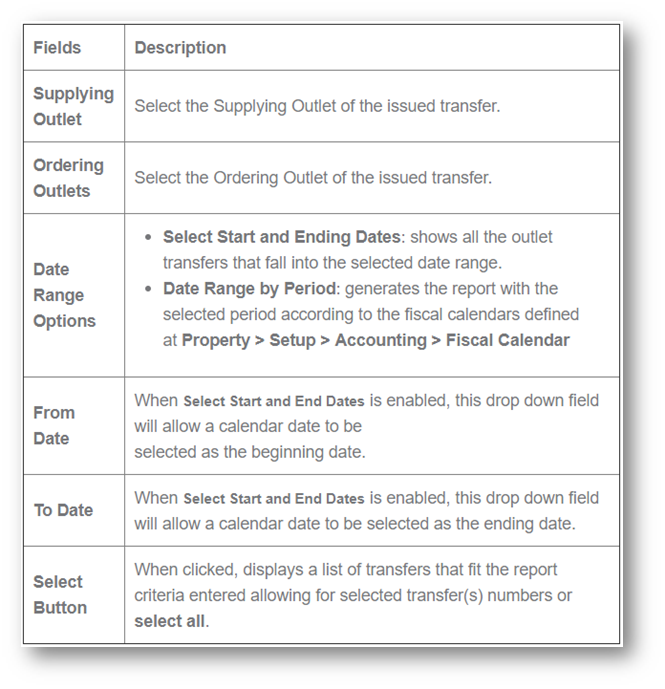
Table 1 – Information for Report Criteria
Please note: The ‘Write Off / Consumption of Goods Report’ can be set to replace the ‘Transfer Receipt report’ when posting a Transfer.
To do this:
-
Go to Property > Administration > Property Preferences > Requisition tab > select Requisition Write Off Report from the Product Transfer Document list
Report Results
When the Write Off / Consumption of Goods Report is generated, the result should look similar to Fig.3.
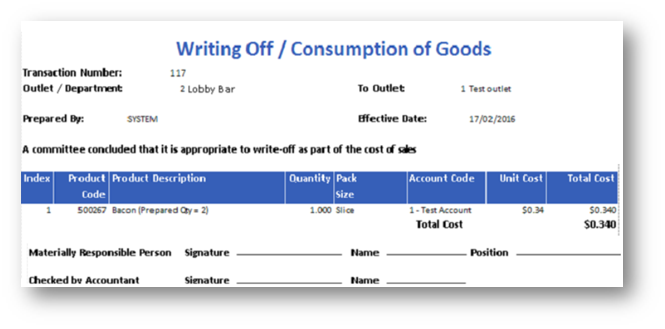
Fig.3 - Write Off / Consumption of Goods report results
|
Fields |
Description |
|
Transaction Number |
The Purchasing & Inventory generated transfer number |
|
Outlet/Department |
The issuing outlet's number and name |
|
To Outlet |
The outlet that received the goods' name and number |
|
Prepared By |
Displays as 'SYSTEM' name and does not display user name information |
|
Effective Date |
Displays the date the transfer was posted |
|
Index |
The line item number |
|
Product Code |
The Purchasing & Inventory product number |
|
Product Description |
Displays the product description or recipe name |
|
Quantity |
Displays the product quantity or recipe quantity issued |
|
Pack Size |
Displays the product pack size or recipe serving size |
|
Account Code |
Displays the product account code or recipe account code charged |
|
Unit Cost |
The product unit cost or recipe cost per serving |
|
Total Cost |
The line item cost.
|
|
Total Cost |
The total of all line items.
|
Please note: The bottom of the page allows for manual signatures for:
-
Materially Responsible Person - signature, name and position
-
Checked by Accountant - signature and name
Comments
Please sign in to leave a comment.