
Product by Vendor Report
The Product by Vendor report is used to analyse a product's purchase volume and the total cost by vendor for received goods.- To run this report, go to Report Centre>Purchasing Reports>Product by Vendor.
- Double-click Product by Vendor report or select the report and click Run Report, to open the report criteria screen, as per Fig. 01.
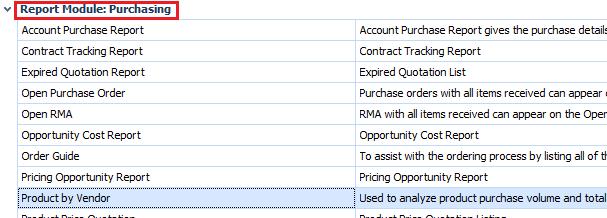
Fig. 01 - Running the Product by Vendor report
Report Criteria
Enter report criteria below to get desired results, as per Fig. 02 below.
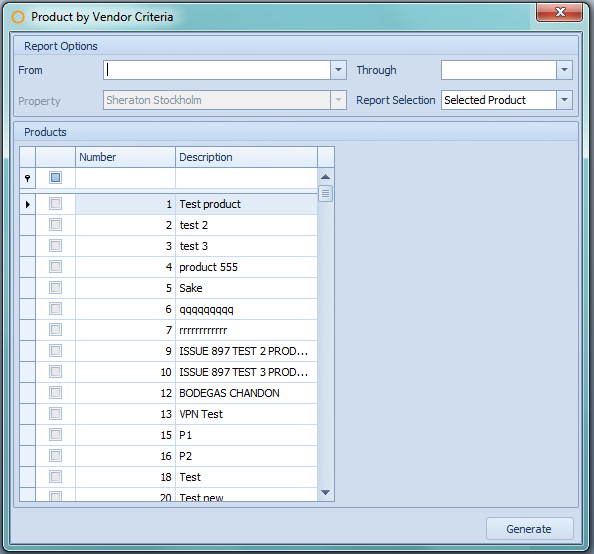
Fig. 02 - Report Criteria for the Product by Vendor report
| Fields | Description |
| From and Through | Able to select a specific date range. |
| Property | This field is enabled to choose one or more property when running the report at Central Purchasing. |
| Report Selection |
Selected Product: generates the report with only the chosen products that have been purchased within the specified date range. All Products: generates the report with all products that have been purchased within the specified date range. Selected Categories: generates the report with only the products from the chosen categories that have been purchased within the specified date range. All Categories: generates the report with products from all the product categories that have been purchased within the specified date range. |
Report Results
When the Product by Vendor report is generated, the result should look similar to Fig. 03.
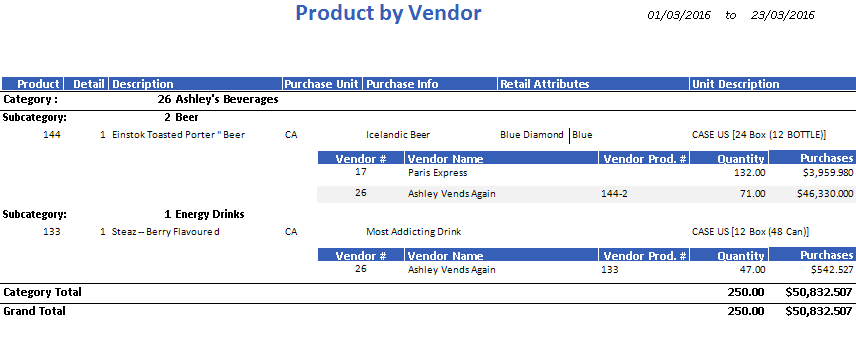
Fig. 03 - Product by Vendor report results
| Fields | Description |
| Product | The Adaco product number. |
| Detail | The Adaco product detail number. |
| Description | The name of the product. |
| Purchase Unit | The abbreviation for the purchase pack unit. |
| Purchase Info | The text entered in the Purchase Info field on the Product Master, located under Property>Products. |
| Retail Attributes | The retail information associated with the product on the Product Master, located under Property>Products>Retail. |
| Unit Description | The product's unit information is displayed as Purchase Unit [PackSize PackUnit (SubPackSize SubPackUnit)]. |
| Category | The Adaco number and name of the category. |
| Subcategory | The Adaco number and name of the subcategory. |
| Vendor # | The Adaco vendor number. |
| Vendor Name | The name of the vendor. |
| Vendor Prod. # | The vendor product number associated to the product on the Product Master, located under Property>Products>Vendor. This may also be found on the Vendor Master, located under Property>Vendors>Product List. |
| Quantity | The total amount received of the product within the specified date range. |
| Purchases | The total cost of the quantity received of the product within the specified date range. |
| Category Total | The total of all the subcategories products' Quantity and Purchases within the category. |
| Grand Total | The total of all the categories products' Quantity and Purchases on the report. |
Comments
Please sign in to leave a comment.