
Invoice Log
This report provides a list of applied invoice information.- To run the Invoice Log report, go to Report Center > Accounting Reports > Invoice Log
- To open the report criteria screen, double-click Invoice Log or select the report and click Run Report, as per Fig.1
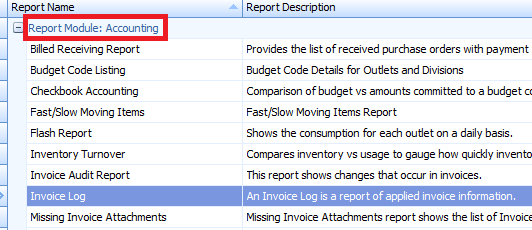
Fig.1 - Invoice Log report
Report Criteria
-
Enter report criteria to get desired results, as per Fig.2
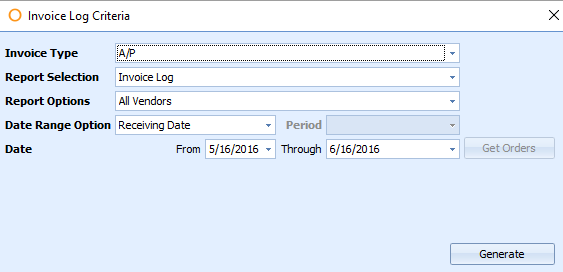
Fig.2 - Report Criteria for the Invoice Log report
| Fields | Description |
|---|---|
| Invoice Type | Select the Invoice type as defined under Property > Setup > Accounting > Payment Methods if applicable. A/P [default] |
| Report Selection |
|
| Report Options |
|
| Date Range Option |
|
| Get Orders button | Used along with the Report Option: Selected PO, to populate the grid with orders that meet the criteria entered. |
Report Results
- When the Invoice Log report is generated, the result should look similar to Fig.3
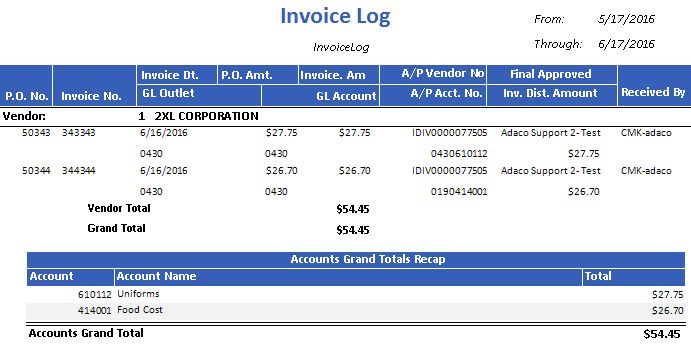
Fig.3 - Invoice Log report results
Please Note: Manually entered invoices will appear on the Invoice Log Report.
For manually entered invoices, "P.O. No" and "Received By" fileds will be blank. The "P.O. Amt" field will contain "0.0000".
| Fields | Description |
|---|---|
| From and Through | Displays the From and Through dates the report was generated for. |
| P.O. No | The purchase order number. |
| Invoice No. | The invoice number. |
| Invoice DT. | The invoice date entered when applying the invoice. |
| P.O. Amt | The purchase order total. |
| Invoice Amt | The invoice amount applied. |
| A/P Vendor No | The accounts payable vendor cross reference number as defined under Property>Vendor menu [If applicable]. |
| Final Approved | Displays the full name of the user that Final approved the order as defined under Property>User Center. |
| Received By | Displays the full name of the user that received the purchase order as defines under Property>User Center. |
| GL Outlet | Displays the general ledger outlet as defines under Property>Setup>Location>Outlet>General Ledger Outlet field. [If Applicable] |
| GL Account | The general ledger account as defined under Property>Setup>Location>Outlet>General Ledger Account field. [If Applicable] |
| A/P Acct No | The accounts payable cross reference number as defined under Property>Setup>Accounting>Accounts>Accounts Payable Cross Reference. [If applicable] |
| Inv. Dist. Amount | The monetary invoiced total on the corresponding purchase order. |
| Vendor | The vendor number and name. |
| Vendor Total | The total amount invoiced per each vendor. |
| Grand Total | The amount invoiced for all order on the report.
|
| Accounts Grand Total Recap |
|
| Accounts Grand Total | The accounts grand total.
|
Comments
Please sign in to leave a comment.