
Retail Price Receiving Report
The Retail Price Receiving Report is used to provide a quick overview of receivings, corresponding accounts, outlets, and invoices. An outlet and a date range can be selected to generate the report according to the criteria.
- To run this report, go to Report Center > Receiving Reports > Retail Price Receiving Report
- To open the report criteria screen, double-click Retail Price Receiving Report or select the report and click Run Report, as per Fig.1
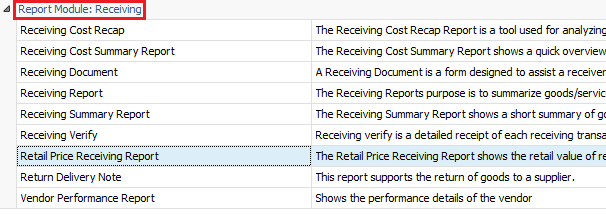
Fig.1 - Running the Retail Price Receiving Report
Report Criteria:
- Enter report criteria below to get desired results, as per Fig.2 below.
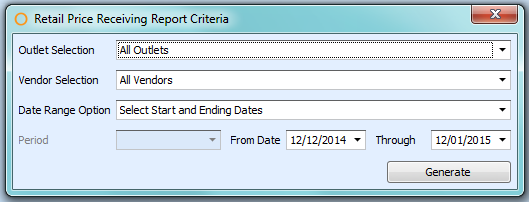
Fig.2 - Report Criteria for the Retail Price Receiving Report
| Fields | Description |
| Outlet Selection |
All Outlets: generates the report by all the outlets. Selected Outlets: generates the report by the outlets chosen. |
|
Vendor Selection |
All Vendors: generates the report by all the vendors. Selected Vendors: generates the report by the vendors chosen. |
| Date Range Option |
Select Start and Ending Dates: generates the report with the selected date range. Date Range by Period: generates the report with the selected period according to the fiscal calendars defined at Property > Setup > Accounting > Fiscal Calendar. |
Report Results
When the Adaco Retail Price Receiving report is generated, the result should look similar to Fig.3.
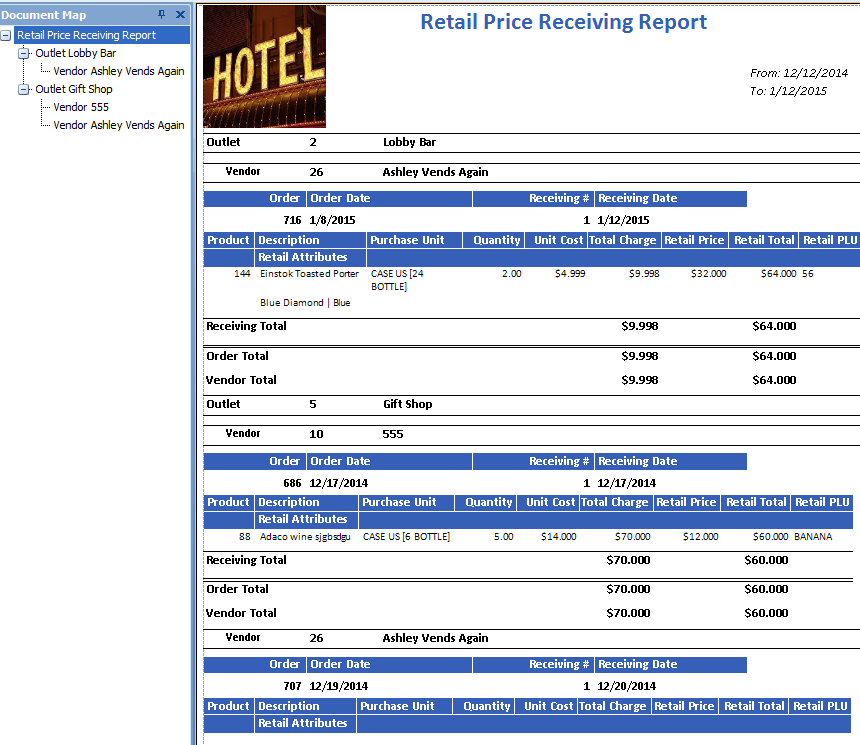
Fig.3 - Retail Price Receiving Report results
| Fields | Description |
| Document Map | Allows selecting of certain outlets and shows receiving cost information for the specified outlet. |
| Outlet | The name and number of the outlet in Adaco. |
| Vendor | The name and number assigned to the vendor in Adaco. |
| Order | The purchase order number. |
| Order Date | The delivery date of the purchase order. |
| Receiving # | If there are multiple receivings against a purchase order, this denotes the receiving. |
| Receiving Date | The day the purchase order was received. |
| Product | The number assigned to the product in Adaco. |
| Description | The name of the product. |
| Retail Attributes | Additional characteristics defined for retail. For example, if the product is a T-shirt, you can create a first attribute "size" with the values S, M, L, and XL, as well as a second attribute "color" with the values "white", "green", "grey", "pink". |
| Purchase Unit | The pack unit with which the product is ordered. |
| Quantity | How much of the product was ordered. |
| Unit Cost | The price of the product per unit. |
| Total Charge | The total cost of the product. |
| Retail Price | The retail price assigned to the product. |
| Retail Total | The total retail price for the product. |
| Retail PLU | The PLU assigned to the product. |
| Receiving Total | The purchasing and retail total of the product. |
| Order Total | The total received cost for the specific purchase order. |
| Vendor Total | The total received for the vendor. |
Comments
Please sign in to leave a comment.