
Outlet Requisition Receipt
The Outlet Requisition Receipt provides the transfer details between outlets.- To run the Outlet Requisition Receipt report, go to Report Centre>Requisition Reports>Outlet Requisition Receipt.
- Double-click Outlet Requisition Receipt, or select the report and click Run Report, to open the report criteria screen, as per Fig. 01.
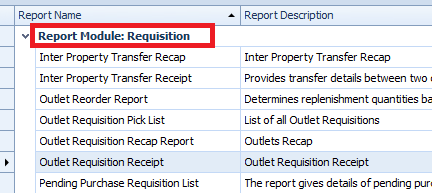
Fig. 01 - Running the Outlet Requisition Receipt report
Report Criteria
- Enter report criteria below to get desired results, as per Fig. 02 below.

Fig. 02 - Report Criteria for the Outlet Requisition Receipt report
| Fields | Description |
|---|---|
| Supplying Outlet |
Select the Supplying Outlet of the issued requisitions.
|
| Ordering Outlet | Shows Select All or allows for selected ordering outlets. |
| Date Range Options |
Select Start and Ending Dates: shows all the outlet requisitions that fall into the selected date range. Date Range by Period: generates the report with the selected period according to the fiscal calendars defined at Property>Setup>Accounting>Fiscal Calendar. |
| From Date | When Select Start and End Dates is enabled, this drop down field will allow a calendar date to be selected as the beginning date. |
| To Date | When Select Start and End Dates is enabled, this drop down field will allow a calendar date to be selected as the ending date. |
| Select Button |
|
Report Results
When the Requisition Receipt report is generated, the result should look similar to Fig. 03
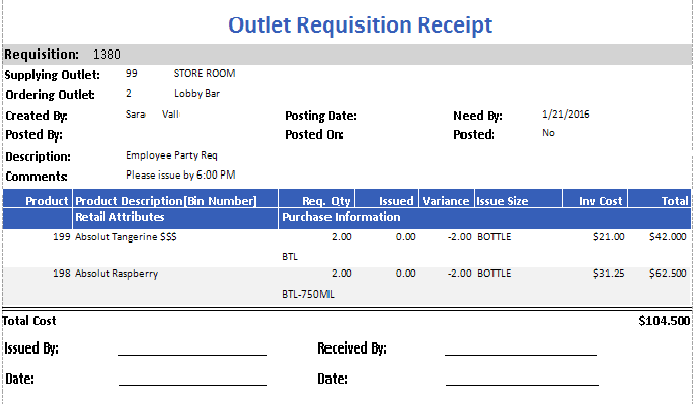
Fig. 03 - Unreleased Outlet Requisition report results
| Fields | Description |
|---|---|
| Requisition | The Requisition number. |
| Supplying Outlet |
The Supplying Outlet number and name.
|
| Ordering Outlet | The Ordering Outlets number and name. |
| Created By | Displays the Full Name of the user that created the transfer. |
| Posted By | Displays the Full Name of the user that posted the transfer. |
| Description | Displays the requisition description entered upon creating the requisition [if applicable]. |
| Comments | Displays the transfer comments entered upon creating the transfer [if applicable]. |
| Posting Date | Posting date entered when processing the requisition. |
| Posted On | The actual date the requisition was posted. |
| Need By | Displays the Need By date entered by the requisition creator. |
| Posted | Displays Yes or No accordingly if the requisition was posted. |
| Product | The Adaco product number. |
| Product Description [Bin Number] | The description of the product and the Bin Number entered under Property>Products [If applicable]. |
| Req. Qty | The line item quantity requested. |
| Issued | The line item quantity issued. |
| Variance | Variance:
|
| Issue Size | The requested unit size on the requisition. |
| Inv Cost | Supplying outlets Inventory Cost from Property>Product>Inventory Button. |
| Total | The total cost of the line items.
|
| Retail Attributes | Displays additional characteristics defined for Retail Attributes for retail product under Property>Products>Retail Button [If applicable]. |
| Purchase Information | Displays the Purchase Information from Property>Products>Purchase Info Field. |
| Total Cost | Monetary sum of all line items on the requisitions inventory cost.
|
Comments
Please sign in to leave a comment.