
To return to the PO Inquiry article contents page please click here.
Structure Type: Property Only
Navigation: Purchasing > Purchase Order Inquiry > in a drop-down list click By Delivery Date > click Search
Use this screen to get the list of purchase orders. By selecting the corresponding purchase order, you can see the detailed information for this purchase order.
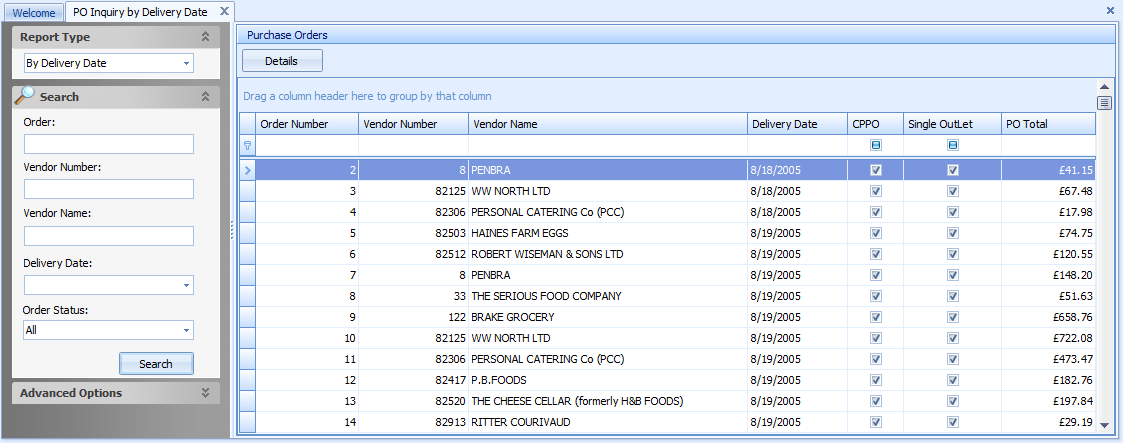
Fig 1 - PO Inquiry by Delivery Date
| Field Name | Description |
|---|---|
| Order Number | The number of a purchase order. Select the purchase order and click this button to see the PO Inquiry by Delivery Date Details screen. |
| Vendor Number | The number of a vendor. |
| Vendor Name | The name of a vendor for the corresponding purchase order. |
| Delivery Date | Displays the delivery date, specified on the Purchase Order Details screen when creating a purchase order. |
| CPPO | If the corresponding purchase order was created at a Central Purchasing, this check box will be selected. |
| Single Outlet | If the corresponding purchase order is intended for one outlet, this check box will be selected. |
| PO Total | The total amount of the purchase order. |
Comments
Please sign in to leave a comment.