
Returns Material Authorization
The Returns Material Authorization report is used to print, view, save, export/e-mail open Returns Material Authorizations.
- To run this report, go to Report Center > Purchasing Reports > Returns Material Authorizaton
- Double-click Returns Material Authorization report or select the report and Run Report to open the report criteria screen, as per Fig.1
Note: The Returns Material Authorization Report can also be run at the Central Purchasing property.
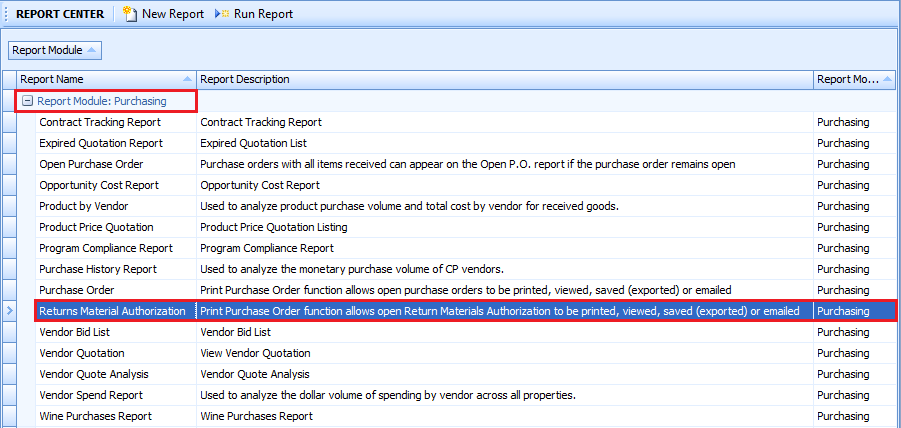
Fig.1 - Running the Returns Material Authorization report
- Enter report criteria below to get desired results, as per Fig.2.
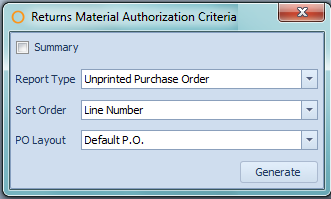
Fig.2 - Report Criteria for the Returns Material Authorization report
| Fields | Descriptions |
| Summary | When enabled, the PO Layout option disappears and the return orders will be summarised. |
| Report Type |
Unprinted Purchase Order: any currently open return orders that have not yet been printed. Date Range: calendar drop-down menus will appear to allow beginning and ending dates to be chosen. Selected Purchase Order: allows a choice of one or more open return orders, regardless of whether the order has been printed already. |
| Sort Order |
Line Number: will generate the report with the products listed numerically by the line number. Description: will generate the report with the products listed alphabetically by the product name. |
| PO Layout |
Default P.O.: displays the default purchase order format. If the property has any custom purchase order layouts, they will appear by name below the Default P.O. |
Report Results
When the Returns Material Authorization report is generated, the result should look similar to Fig.3.
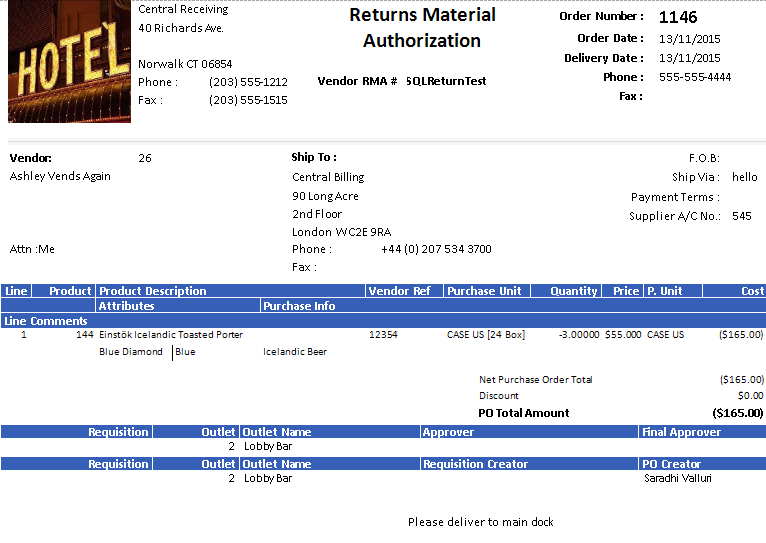
Fig.3 - Returns Material Authorization Report results
| Fields | Description |
| Order Number: | The Adaco number of the return order. |
| Order Date: | The date the return was created. |
| Delivery Date: | The date specified when the return order was created. |
| Phone: | The phone number defined on the Vendor Master, located Property > Vendors. |
| Fax: | The fax number defined on the Vendor Master, located Property > Vendors. |
| Vendor RMA# | The Returns Material Authorization number put into the RMA Number* field on the return order. |
| Vendor: | The name and Adaco number of the vendor. |
| Ship To: | The selected shipping address, from the address defined under Property > Setup > Location > Address Book. |
| F.O.B: | Displays what was entered into the F.O.B. field on the return order. |
| Ship Via: | Displays what is entered into the Ship Via field on the Vendor Master. |
| Payment Terms: | Displays what is entered into the Terms field on the Vendor Master. |
| Supplier A/C No.: | Displays what is entered into the Customer Reference # field on the Vendor Master. |
| Line | The line number associated with the product(s) on the return order. |
| Product | The Adaco number of the product. |
| Product Description | The name of the product. |
| Vendor Ref | The Vendor Product Number associated with the product. |
| Purchase Unit | The product's unit information is displayed as PurchaseUnit [PackSize PackUnit (SubPackSize SubPackUnit)]. |
| Quantity | The amount of the product being returned. |
| Price | The current purchase cost associated with the product on the Product Master. |
| P. Unit | The purchase unit for the product as defined on the Product Master. |
| Cost | The extended cost of the amount of the product being returned.
|
| Attributes | Displays the retail attributes associated with the product, located under Property > Products > Retail. |
| Purchase Info | Displays what has been entered into the Purchase Info field on the Product Master. |
| Line Comments | Displays what has been entered into the Comments field for the product on the return order. |
| Net Purchase Order Total | The sum of the amounts in the Cost column. |
| Discount | The amount entered into the Discount field on the return order. |
| Rates | If any Rate Schedules are assigned to products, the amount of the rate will appear along with the name of the rate. |
| PO Total Amount | The total of the return order.
|
| Requisition | The Adaco number for the purchase requisition, if the purchase order was created from a purchase requisition. |
| Outlet | The Adaco number for the outlet. |
| Outlet Name | The name of the outlet. |
| Approver | The name of the user who approved the purchase requisition. This field will only appear if it is enabled under Property > Administration > Property Preferences > Purchasing > Display Name. |
| Final Approver | The name of the user who final approved the purchase requisition. This field will only appear if it is enabled under Property > Administration > Property Preferences > Purchasing > Display Name. |
| Requisition Creator | The name of the user who created the purchase requisition. This field will only appear if it is enabled under Property > Administration > Property Preferences > Purchasing > Display Name. |
| PO Creator | The name of the user who created the purchase order. This field will only appear if it is enabled under Property > Administration > Property Preferences > Purchasing > Display Name. |
When the Returns Material Authorization report is generated with the Summary option enabled, the result should look similar to Fig.4.
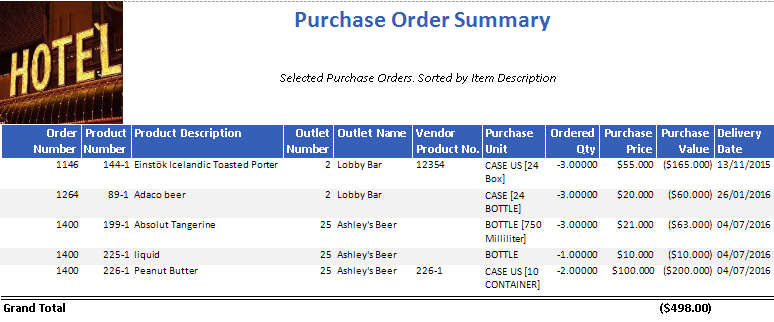
Fig.4 - Returns Material Authorization Report results when Summary option is enabled
| Field | Description |
| Ordered Qty | The amount of the product being purchased on the purchase order. |
| Purchase Price | The cost of the product being purchased. |
| Purchase Value | The total cost of the amount of product being purchased.
|
| Grand Total | The sum of the Purchase Value column. |
An additional field is present when generating the Returns Material Authorization Report at Central Purchasing, as can be seen in Fig.5 below.
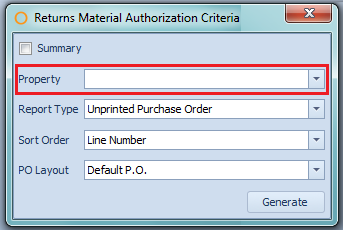
Fig.5 - Report Criteria for the Returns Material Authorization when generating at Central Purchasing
| Fields | Description |
| Property | Allows the choice of a property that is connected with the Central Purchasing property. |
Comments
Please sign in to leave a comment.