
Project Report
This report is designed to keep track of purchases charged against capital projects.- To run the Project Report go to Report Center > Accounting Reports > Project Report
- To open the report criteria screen, Double-click Project Report or select the report and select Run Report, as per Fig.1
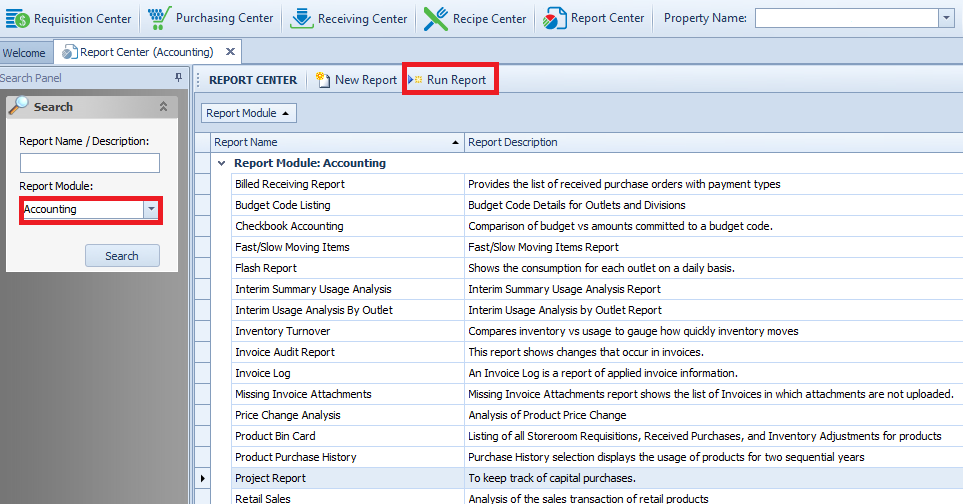
Fig.1 - Running the Project Report
Report Criteria:
- Enter report criteria to get desired results, as per Fig.2

Fig.2 - Report Criteria for the Project Report
| Fields | Description |
|---|---|
| Select Project | Select the project name as created under Purchasing > Project > Project Center. |
Report Results
-
When the Project Report is generated, the result should look similar to Fig.3
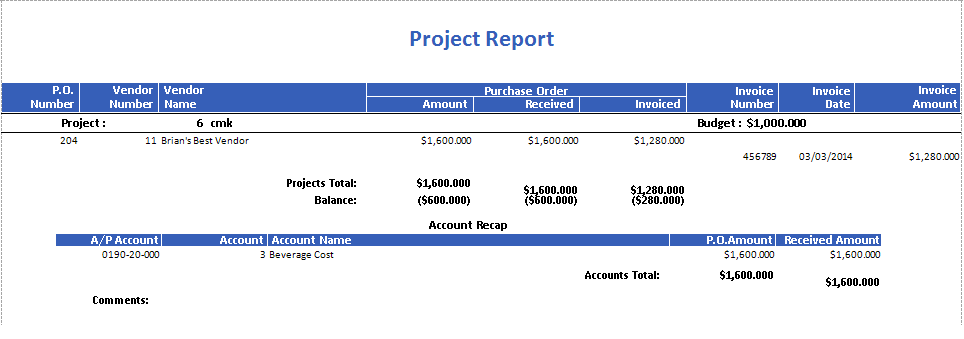
Fig.3 - Project Report results
| Fields | Description |
|---|---|
| P.O.Number | The purchase order number. |
| Vendor Number | The Adaco vendor number as defined under Property > Vendors. |
| Vendor Name | The Adaco vendor name as defined under Property > Vendors. |
| Purchase order |
|
| Invoice Number | The invoice number applied against the order. |
| Invoice Date | The Invoice Date entered when posting the invoice. |
| Invoice Amount | The monetary value of invoice receivings against the project budget. |
| Project | Displays the project number and name as created under Purchasing > Project > Project Center. |
| Budget | The monetary value assigned to the budget field under Purchasing > Project > Project Center. |
| Project Total | Sum of the purchase order Amount, Received and Invoiced columns. |
| Balance | The Budget total +/- the purchase order amounts, received amounts and invoiced amounts.
|
| A/P Account | Displays the Account Cross-Reference information as defined in Property > Setup > Accounting > Accounts [If Applicable]. |
| Account | The Adaco account number as defined under Property > Setup > Accounting > Accounts. |
| Account Name | The Adaco account name as defined under Property > Setup > Accounts. |
| P.O. Amount | Displays the monetary purchase order sum of each account. |
| Received Amount | Displays the monetary received sum of each account. |
| Accounts Total | Displays a monetary grand total of all accounts applicable to the orders on the project. |
| Comments | Displays the contents of the Comments field entered when creating the project in Purchasing > Project > Project Center. |
Comments
Please sign in to leave a comment.