
Price Change Analysis Report
- To run the Price Change Analysis report go to Report Centre>Accounting Reports>Price Change Analysis report.
- Double-click Price Change Analysis Report or select the report and click Run Report, to open the report criteria screen, as per Fig. 01.
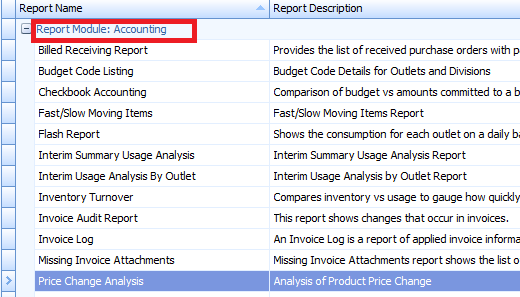
Fig. 01 - Price Change Analysis report
Report Criteria
- Enter report criteria to get desired results, as per Fig. 02 below.
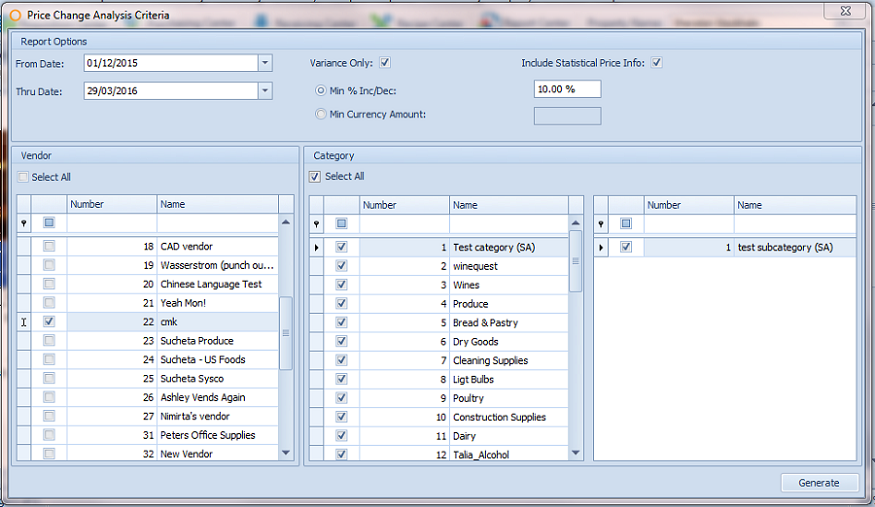
Fig. 02 - Report Criteria for the Price Change Analysis report
| Fields | Description |
|---|---|
| From Date | Enter the from date. |
| Thru Date | Enter the thru date. |
| Variance Only | If checked, shows products with variances only and enables choosing Min % or Min Currency. |
| Min % Inc/Dec | If the Min % radio button is selected, enter a percentage of price increase or decrease in the box. |
| Min Currency Amount | If Min Currency radio button is selected, enter a monetary value of price increase or decrease in the box. |
| Include Statistical Price Info | If checked, will display the Highest Price, Lowest Price and Average for the date range. These are absolute values and are not related to the Min option selected. |
| Vendor | Allows for choosing all or selected vendors. |
| Category | Allows for choosing all or selected categories. |
Report Results
- When the Price Change Analysis report is generated, the result should look similar to Fig. 03.
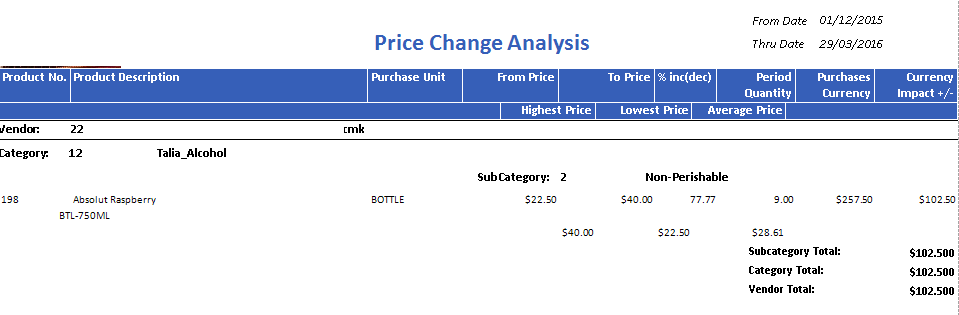
Fig. 03 - Price Change Analysis report results
| Fields | Description |
|---|---|
| Product No. | The Adaco product number. |
| Product Description | The name of the product as entered under Property>Products. |
| Purchase Unit | The purchase unit assigned on the Product Master. |
| From Price | The purchase unit price on this date. |
| To Price | The purchase unit price on this date. |
| % inc(dec) | Displays the percent change. Using the above report as an example:
17.50 / 22.50 x 100 = 77.77 % |
| Period Quantity | The item quantity purchased for the date range entered. |
| Purchase Currency | The monetary sum of the quantity purchased from the vendor for the date range entered. |
| Currency Impact +/- | The currency impact is the monetary impact.
|
| Highest Price | The highest price paid for the item for the date range entered. |
| Lowest Price | The lowest price paid for the item for the date range entered. |
| Average Price | The average price of the item for the date range entered.
|
| Vendor | Displays the selected Adaco vendor number and name. |
| Category | Displays the selected Adaco Category number and name. |
| Sub Category | Displays the sub category(s) assigned to the category chosen. |
| Sub Category Total | Total of the Sub Category.
|
| Category Total | Total of all sub categories within a specified category.
|
| Vendor Total | Vendor Total is all purchases with that date range chosen for the selected vendor. |
Comments
Please sign in to leave a comment.