
Invoice Audit Report
This report displays changes made to invoices for any additions/changes/deletions including the invoice attachments.- To run the Invoice Audit Report, go to Report Center > Accounting Reports > Invoice Audit Report
- To open the report criteria screen, double-click Invoice Audit Report or select the report and click Run Report, as per Fig.1
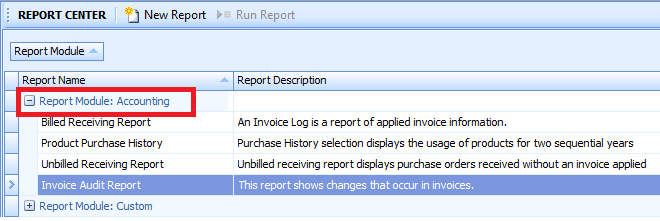
Fig.1 - Running the Invoice Audit Report
The Report Criteria will then display, as per Fig.2.
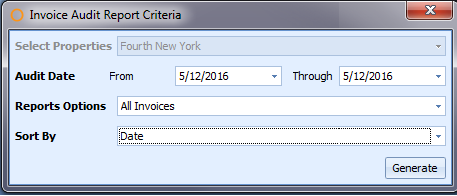
Fig.2 - Report Criteria for the Invoice Audit Report
Report Fields and Descriptions
Report Fields and Descriptions
| Fields | Description |
|---|---|
| Select Property | Displays the property name. |
| Audit Date | Enter the date range needed to generate the report. Default [today's date]. |
| Report Options |
|
| Sort By |
|
Report Results:
- When the Invoice Audit Report is generated, the result should look similar to Fig.3
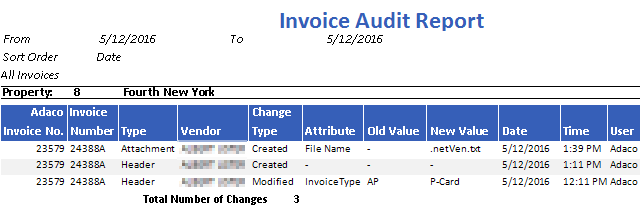
Fig.3 - Invoice Audit Report results
NOTE: A - (dash) represents a new record so there is nothing to display. | Fields | Description |
|---|---|
| Property | Displays the property name. |
| Adaco Invoice No. | Displays the Adaco Invoice system-generated invoice identifier. |
| Invoice Number | Displays the user-entered invoice number at Receiving or Receiving corrections. |
| Type | The Type of value modified in the invoice.
|
| Vendor | The vendor name as defined under Property > Vendors |
| Change Type | Display the change type
|
| Attribute | Displays the attribute added or modified:
|
| Old Value | Displays the old value of the modified field of the invoice. |
| New Value | Display the new value of the field modified of the invoice. |
| Date | The date the invoice or attachment was applied or edited. |
| Time | The time the invoice or attachment was applied or edited. |
| User | Displays the LogOn Name of the user that performed the action as defines under Property > User Center > LogOn Name field. |
| Total Number of Changes | The numeric total of records created or modified for the date range entered. |
Comments
Please sign in to leave a comment.