
For most point-of-sale systems, once you’ve posted schedules in your HotSchedules site, the schedule import function can be enabled.
Importing your schedules from HotSchedules into your POS allows you to use punctuality controls to regulate your employees’ clock-ins.
For Simphony, please speak to your POS vendor.
Punctuality controls allow you to set up a window of time, e.g. 5 minutes, during which employees can clock-in on their own. Outside of that time, they need a manager override in order to clock-in.
Enabling Schedule Imports
- Set up the controls in your POS (see next page for common POS setups)
-
Contact HotSchedules to turn on Schedule Imports
- a. If you’re in implementation, contact your Implementation Specialist.
- b. If you’re no longer in implementation, contact Customer Care.
Once Schedule Imports are turned on, they become effective the next day.
Common POS Punctuality Control Setups
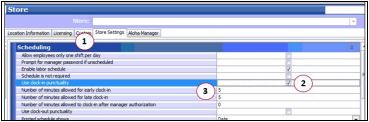
Aloha
1. Go to Store Settings
2. Under Scheduling, check the box for “Use clock-in punctuality”
3. Enter the number of minutes allowed for both early and late clock-ins
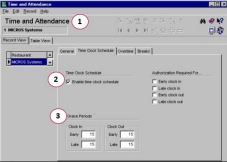
MICROS
1. Go to Time & Attendance, then to “Time Clock Schedule”
2. Check the box for “Enable time clock schedule”
3. Under Grace Periods, enter the number of minutes allowed for both early and late clock-ins.
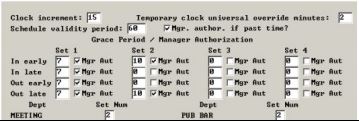
POSitouch
1. Go to Back Office Setup > T&A Front of the House > Times and Grace Period
2. Set the “in early” and “in late” minutes
Comments
Can this be updated for Simphony?
Hi Jessica Sepkowitz,
Thank you for your suggestion, we will look into it!
Kind regards,
Fourth & HotSchedules
Instructions for Toast POS please?
Hi James, here are the instructions for Toast.
Please sign in to leave a comment.