
Overview
Employers can choose which sensitive information fields are set as optional fields to be filled out when creating an Employee. This information is then recorded in the Employee’s Details.
This article describes the process of setting up the selection of sensitive information which is to be displayed and recorded.
Setting up Sensitive Information Fields
- Select the HR Module

Fig.1 – HR Module
- Select Global Settings in the Administration drop-down menu
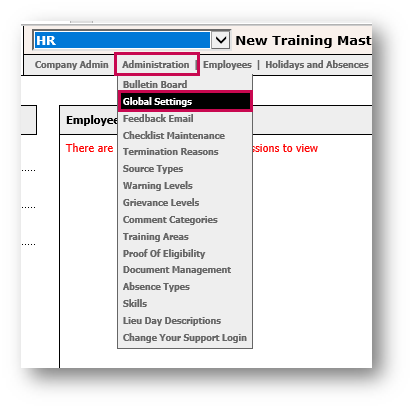
Fig.2 – Global Settings in the Administration Drop-Down
- Select Edit Sensitive Information

Fig.3 – Edit Sensitive Information Option
- Switch on the Sensitive Information setting by ticking the Sensitive information to be completed on employee creation box
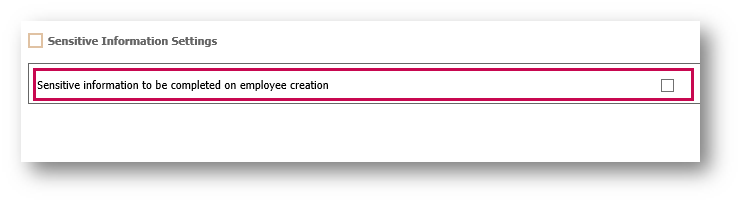
Fig.4 – Sensitive Information Tick Box
This will open the Sensitive Information options.
- Select from this list which information that the company would like to record
Please Note: By switching this setting on, it will appear as a separate page when creating an Employee but it is always optional rather than mandatory. Due to the regulations which surround ethnic monitoring, there is no way of making this mandatory for completion.
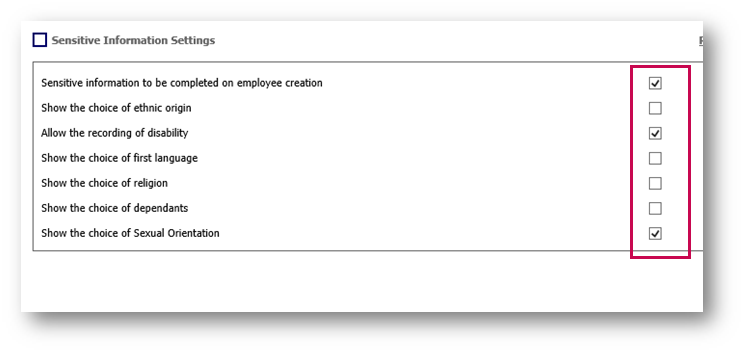
Fig.5 - Sensitive Information Settings
To view the Sensitive Information page within the Employee’s details:
- Select Sensitive Information in the Employee Info drop-down menu
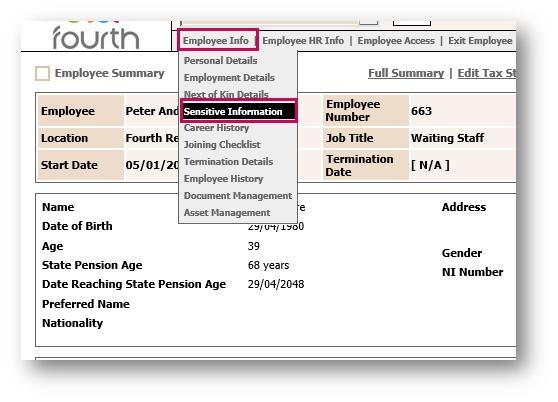
Fig.6 – Sensitive Information in the Employee Info Drop-Down
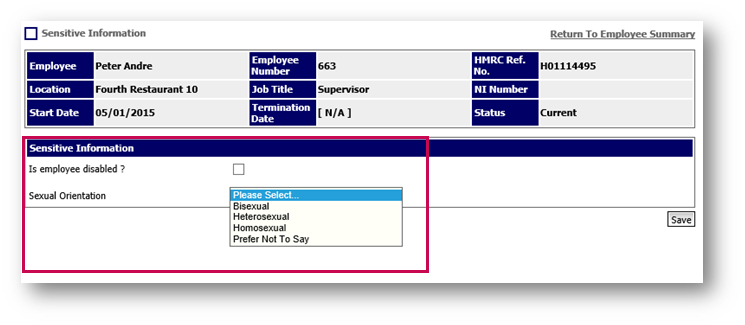
Fig.7 – Sensitive Information Page
Comments
Please sign in to leave a comment.