How can I export all the users that have access to all locations in Fourth?
I’ve tried running a list based on the access level “All Locations”, but it isn’t showing any users.

How can I export all the users that have access to all locations in Fourth?
I’ve tried running a list based on the access level “All Locations”, but it isn’t showing any users.

Good afternoon @...
You can run the "Security matrix" export, which will show all the users on the portal and their access to locations/divisions by following the path below.
HR > Reports > Exports > Security Matrix > Run report.
If employees have access to all locations/ divisions, it will show as below.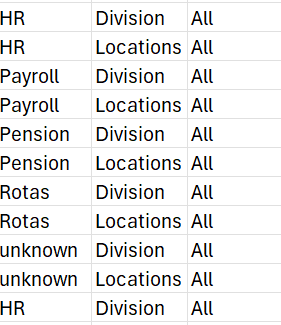
If this is not the case for you please raise a support ticket with examples of employees who have access to all locations/ divisions which does not show on the report, and we will investigate further.
Have a nice day.
Please sign in to leave a comment.
Download Our App
Comments