I have amended employees' settings under HR to include them on the Rota. When I go to the rota, these employees are not automatically added to the rota but need to be included via Add Employee link, each employee separately for each week. Is there a way they can be included on the Rota? Thank you
Employees missing from Rota

0 votes
Linked Ideas

Hi @Karen Sheffield,
If the rota has been created and is 'open' when an employee is created for the first time or set up as a Multiple Employment they will need to be added once through the Add Employee option. After this has been done, they should be included in any new rotas which are created as long at the Multiple Employment(ME) lasts for that duration, and there should be no requirement to add again. Any new ME set up for that employee will require the process to be repeated.
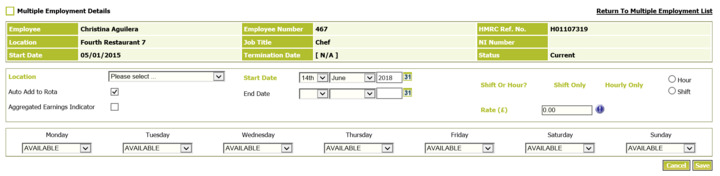
When creating the ME, ensure that the 'Auto Add to Rota' is ticked, if this is de-selected the employee will need to be added through the 'Add Employee' functionality.
I hope this helps?
Cris
Fourth
Thank you Cris, to clarify these employees are not new hires neither they have multiple employment, I had to amend their settings to include them on Rota (Is Employee Included In rota?) on the Employment Details screen. My weeks are open until the end of 2018, would you suggest to delete any future open rotas to rectify the issue?
Thank you
Snezana

Hi @Karen Sheffield
Do you have an example of a Job title that this is happening to?
If the setting in the employment details page is not set to include them in the rota then they will not appear. This is usually done when an employee starts.
If your requirement is to have all salaried employees appearing on the rota, this will need to be changed for each employee affected.
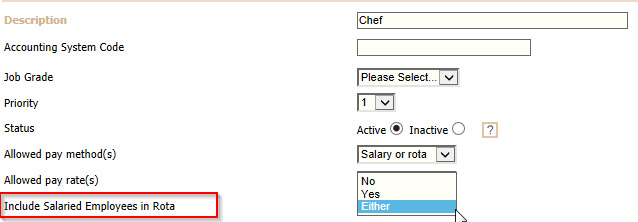
Once all employees have been changed in the employment details page, you can lock the job title down so that they are always included in the rota.
Hope this helps
Kindest
@Debbie Thomas
@Cristabelle Metcalfe
Hi, thank you for your response.
Under employment details he is set to be included on the rota. Also his job title has been locked to include salaried employees on the rota, I have manually added him up to and including w/c 16/07/18, although as of w/c 23/07/18, he is not appearing on the employee list.
Thank you
Snezana

Hi @Karen Sheffield,
Thanks for this information - We've had a look at this and as you've followed the above steps, we believe this might need further investigation as it looks like a technical issue.
For technical issues, I recommend for you to Raise a Technical Case with our Technical Support team. To do this, you can either escalate to the member(s) of your business who are responsible for raising cases with Fourth. Or if you are this person, you can select your name on the top right of the Customer Community and select the 'Raise a Technical Case' from the drop-down options.
Best,
Rozz
Fourth
Please sign in to leave a comment.
Download Our App
Comments