Hi
We upload a payment file to pay our staff tips however this pay type sits on the payroll with a zero balance and each time we do it another pay type is created. Is there a way to clear them out in bulk each week once the payroll has been done.
Pay Elements
0 votes
Linked Ideas

Hi @Sharon Harkins
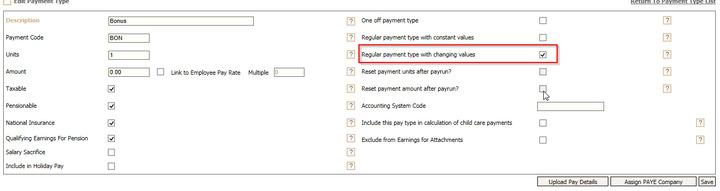
The Payment type should be set up as a regular payment type with changing values.
This will then reset each payrun without the need to create a new payment type.
Hope this helps
Debbie
Fourth

@Debbie Thomas Hi I have checked our settings and this is how we have it set up - can you confirm if I should be ticking the box that the arrow is pointing to ?
Hi @Sharon Harkins
Are you querying why a payment type is created each time in the employee record? [rather than a new payment type]
If so, this is what happens with uploads as it enables visibility and creates a history.
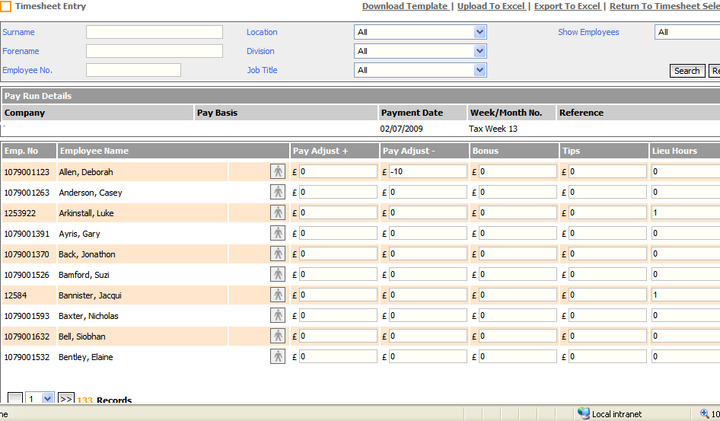
You could use, Timesheet input which will keep the single payment type in their record.
Please book on an Ask Fourth and we can set this up for you.
Kind regards
Debbie
@Saskia Dykstra @Lucy Cunningham
Hi sorry I may not be explaining my self, when we look in the record of the employee you can see lots of lines with the tips as the payment type which we delete so that we can clearley see all payment types that are relevant.
If there was a way to bulk delete them once payroll has been done that would work ?
Hi @Sharon Harkins , yes that is what I thought. Unfortunately this is how the upload works and there is no bulk delete.
I would suggest you use Time sheet input so that these payment types are not duplicated with each upload.
Kindest
Debbie
Fourth
thanks @Debbie Thomas does it work in the same manner ? never used time sheet before ?
Hi @Sharon Harkins Very similar, however payments can be entered as Units or Amounts.
Once set up, a template can be downloaded for completion and uploaded. or entered directly into the system.
#Timesheet
Please sign in to leave a comment.
Download Our App
Comments