We need to accrue holiday in days, but as that number of days per week changes how can I calculate their base allowance? 28 days is for a 5 days per week team member.
How can we illustrate 4 on 4 off rotas for holiday allowance?

0 votes
Linked Ideas

Hi,
For holiday to be calculated for employees that work a 4 on 4 off shift pattern, there are a few steps that need to be completed.
The Job title should be set up as
5 days,
number of hours worked a day x 5, e.g 5 x 12 = 60 - (This ensures the day rate is correct.)
28 days holiday.
In the employees employment details page, you will need to 'Override the FTE'
Selecting Part Time may open the box to enter this.
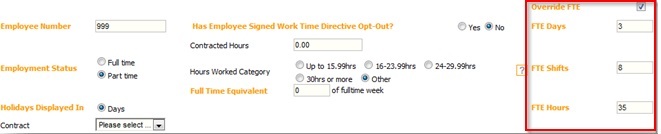
In the Override box enter
3.5 days - This is the average over a year for 4 on 4 off workers.
3.5 number of shifts
The number of hours in a shift x 3.5 (12 x 3.5 = ) 42
This will calculate the employees holiday entitlement at 20 days.
3.5 x 5.6 = 19.6
If override FTE is not enabled. This can be turned on by Fourth. It is best to do this at the start of a holiday year.
Hope this helps
Debbie
Fourth

Hello,
We have two employees who previously did 5 day, 4 hour pattern, but now move on to do 4on 4 off pattern. I don't have the override FTE option, how can I get this?
Many thanks,
Laura

Hi @Laura Johansson
The Override FTE permission would need to be set to 'Full Access' in the user template that is assigned to your level in the access level hierarchy.
This would need to be done with the admin log in or an employee that sits above you in the access level hierarchy if they have access to the templates.
HR > Users > Templates > [Select relevant template] > Allow Override of Job Title FTE > Full Access > Save

Please do be aware that this would allow any other employee that is on the same level as you to change the FTE for employees also.
Best
Stevey Scott
Please sign in to leave a comment.
Download Our App
Comments