Hi. We would like our Assistant Financial Controller to have the same access to the Payroll module as our Financial Controller.
Currently both the FC and AFC can see all staff in the HR module apart from those that sit on the same hierarchy or above them in the hierarchy. However, our FC has access to the Payroll module to run payroll which no one else has (including myself who has Admin access).
How can I give Payroll access to the AFC?
Thanks.
Access to Payroll Module

0 votes
Linked Ideas
Hi @Debbie Thomas
Thanks for your response. What do you mean by 'if bespoke access has been given through this page, a template will need to be reassigned for the template to take affect'? How do I do this?
Thanks.

Hi {@005D000000ANJdYIAX}
The first thing to do is run the employee access level report in HR > Users to find out which level of the hierarchy the employee is on. You should also check which who else sits on this level.
Then in the Access Level Hierarchy, select the relevant level and ensure a payroll module template is assigned.
If the template assigned does not have the correct access, you can either change the template which will update for all users on this level, or assign a relevant template to the employee via Payroll > Users > Assign user access > User profile
Please note that if bespoke access has been given through this page, a template will need to be reassigned for the template to take affect.
It is a good idea to review all templates. The attached spreadsheet will assist with this. You can map your current templates onto the spreadsheet. This will help to see who has access to what and which templates are assigned to each level of the hierarchy.
- open the spreadsheet and enter the hierarchy levels at the top of the page.
- Go into each hierarchy level and enter the template assigned under each hierarchy level.

- For each template map the permission on the spread sheet in the relevant column.
- Review the permissions definition articles if you need help on what permission is needed and amend on the spread sheet
- https://fc.force.com/customer/s/article/WFM-Definitions-of-HR-Permissions
- Update the templates to reflect the spreadsheet.
I hope this helps
Kind regards
Debbie
Fourth
Hi @Danni Fasolino Bespoke access is when user permissions have been assigned to an employee on an individual basis via HR > User > Assign User Access > User profile.
We do not recommend this as all amendments to access should be on a template for consistency.
To override Bespoke access on this page, the template needs to be reassigned.
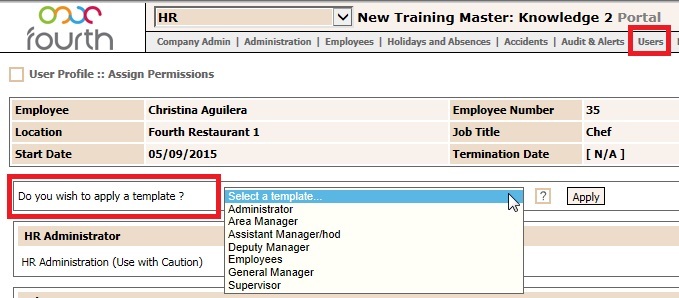
Hope this helps
Debbie
Fourth.
Thanks @Debbie Thomas
Please sign in to leave a comment.
Download Our App
Comments