
A question from the lovely @Elaine Reilly:
Is there anywhere in Adaco you can add a minimum order value to a vendor? I notice in the property admin you can warn the PO creator that minimum value hasn't been reached however I cant see where you can set the minimum value on the vendor.
Best,
Rozz
Fourth
Adaco: Minimum order values
0 votes
Linked Ideas

Hi {@005D0000006UYCkIAO}
There are a number of alerts that can be set-up in regards to ordering from Vendors.
For Minimum Orders go to Property->Vendors->Select The Vendor->Vendor Details->You can set a Minimum order by price or quantity:
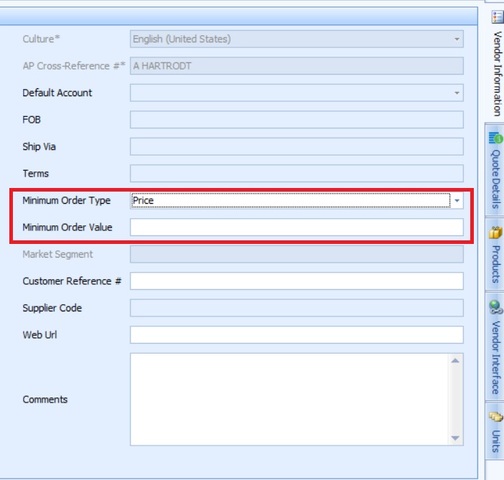
You can also set certain Delivery Days for the vendor on this screen as well.
Using the Options tab on the right of the screen, you can also set a Lead Time and Cut-off time for the vendor.
For all alerts, they require you turning on the Warning Message as well. This is done by going to Property->Administration->Property Preferences->Purchasing
There are also Warning Messages in Property->Administration->Property Preferences->Requisition
Hopefully that gives you what you are looking for. You can also assign lead times to particular Products. If you ever want to know how then why not post again on the Community.
Best
Mark
Fourth

great, thanks
Please sign in to leave a comment.
Download Our App
Comments