I need to open a closed rota as someone worked when they were on holiday
How do you open a closed rota

0 votes
Linked Ideas

Hi @Andrew Gurney
To open a closed rota select the rota you would like to re-open and change the status drop-down on the right hand corner of the rota.
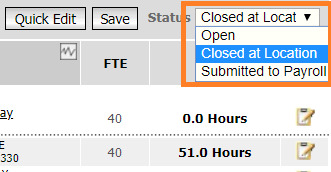
If you do not have the permission to do so and therefore won't have the drop-down list available, I suggest speaking to someone from your business who handles the creation of rotas (usually the HR or Finance department).
If the rota was already submitted to payroll then here is an article explaining how to roll back the rota to make changes to it.
https://help.hotschedules.com/hc/en-us/articles/360042291752-WFM-Rolling-back-a-Rota
I hope that makes sense.
Best,
Daniela
Fourth

Hi @Andrew Gurney,
Are you wanting to re-open the day or open a closed at location or submitted rota?
Holidays should always be created in HR and they will feed into rota automatically, we would not recommend them being put in retrospectively.
When I know more, I can advise you further.
Best,
Cris
Fourth
Hi Daniela
I have full access but don't get the open option
Andrew
Hi @Andrew Gurney
Can you confirm if its the ROTA or the DAY you wish to re-open?
You cannot re-open a Rota once it has been submitted to Payroll. However, depending on your permissions you may be able to roll back a rota- please be aware of my previous post there are implications to doing this.
The below Article explains this process for you.
https://fc.force.com/customer/s/article/WFM-Rolling-back-a-Rota
Best
Cris
Fourth
@Daniela Tanneberger
Please sign in to leave a comment.
Download Our App
Comments