Inventory: How can I see how much stock I have available when ordering?

Linked Ideas

Hi there,
Great question, I get asked this a lot so thank you for bringing it up on the community.
You can see this information in the ordering page itself. There is a feature called 'Stock On Hand' which you can easily activate yourself using the cog icon on the top right of the ordering page:
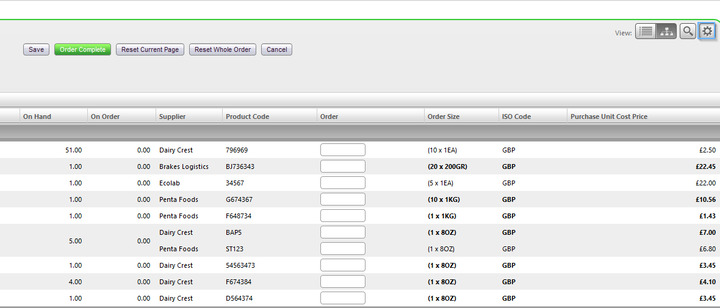
Organize Settings > Tick: Show 'Stock On Hand' and 'Stock On Order' Columns > Save.
This will add an extra column to your ordering page called 'On Hand'.
'On Hand' will show you how much stock is available at the selected site for each product. This is calculated using your deliveries, returns, transfers, requisitions and POS data. Please note: POS data is usually only received once per day, unless your organization is set differently.
I hope that helps.
Best
Simon
Fourth
Please sign in to leave a comment.
Download Our App
Comments