How do you revert the 'exclude from payroll' option?

0 votes
Linked Ideas

Good Morning @Joanne Griffin ,
The exclusion happens because the person creating the employee record has ticked the ‘Exclude from payroll’ box in the HR Module ‘Employment Details’ page:
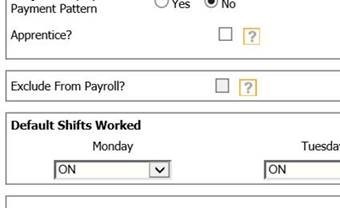
The excluded employees can then be added to payroll using this path:
Payroll Module> Employees> Include Employees In Payroll> [search company and pay basis]> Select all> process.
I have also attached a link below for a really useful article that talks about this in a bit more depth.
I hope this helps?
Cris
Fourth
Please sign in to leave a comment.
Download Our App
Comments