How to set up Wage Target for overhead departments who don't produce any revenue?

Linked Ideas

Hi @Karen Sheffield,
As Wage Target percentages require a revenue, you can either set your overhead departments to be targeted on total revenue or enter a cash target through the Edit Revenue Targets page in Configure Location. You can find this through the following path:
Rota > Administration > Configure Location > Select Location > Edit Revenue Targets > Annual Budget > Select Year > Select Week > Enter Cash Target
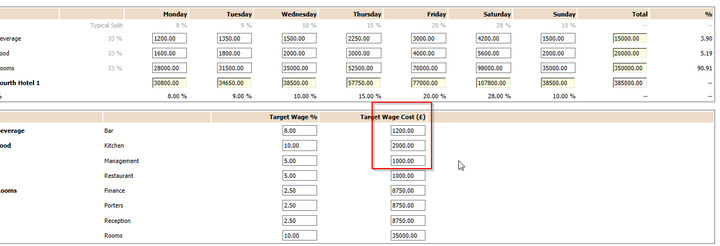
I hope this helps! There are also a few articles about creating wage targets that might help too - Just search for them in the Search bar above!
Best,
Silvio
Fourth
Hi Silvio,
I have tried inputting Wage Targer as a cash target, although the system doesn't save the entry. Once I go back to the selected week's budgets, the fields shows as blank.
Could you please help,
Thank you
Snezana
Hi @Karen Sheffield once you have entered the cash target, you need to click anywhere on the page, this will save the information you have entered.
Hope this helps
Debbie
Hi Debbie
unfortunately its hasn't resolved the issue - I entered the weekly wage target (£), clicked anywhere on the screen, save it, then returned to the screen and the entry is not there.
Kind regards
Snezana

Hi @Karen Sheffield,
I hope you don't mind me jumping in here! 😊
This sounds like a technical error, rather than best practice. I would recommend for you to raise this as a technical case to our Technical Support team. You can do this by using the Profile dropdown on the top right of the Customer Community or escalating to the member of your business responsible for raising cases with Fourth.
Just wanted to direct you as it sounds more like a technical issue! Let me know if there is anything I can do to help!
Best,
Rozz
Fourth
Please sign in to leave a comment.
Download Our App
Comments