Removal of holidays from 2016
How do we remove a holiday request from 2016 as I am only able to view 2017 historically

0 votes
Linked Ideas

Hi @zoe jones ,
Thanks for posting your question. Deleting older holiday requests is possible - please follow the steps below.
Within the HR module, go to Holidays and Absences > Employee Holidays.
From here, select a Location and then search for the employee (by surname) and use the Dates From fields to go back to 2016.
Put a tick in the 'Delete' box next to the holiday request and then select Delete at the bottom of the page.
If you cannot see the Employee Holidays option, it will be due to you not having the appropriate permissions. There may be someone else within your organisation who will be able to do this.
Hope this helps. It's a good question and one that I hope some of our other customers will benefit from seeing here on the Community.
Best,
Paul
Fourth

Hi Paul,
There is no delete box next to the absence section.
Hi, @Dimitar Ushev.
Please have a look at this screenshot. If this is definitely the same page that you're on (the colour might be different) but you don't have the 'Delete' box, then it will be due to your user profile not having the appropriate permissions. You'll need to speak to whoever at your organisation is responsible for administering the system.
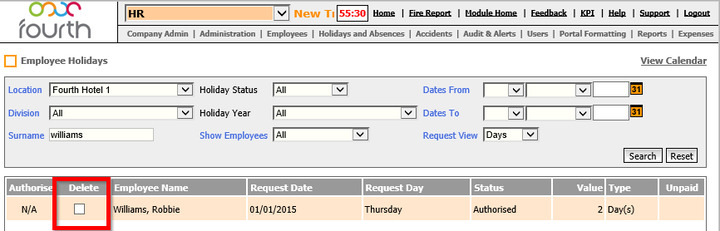
I hope this helps. Any further questions, please just let us know.
Thanks,
Paul.
Please sign in to leave a comment.
Download Our App
Comments